What Google Business Profile Management in Wichita Really Means
Google Business Profile management in Wichita means someone keeps your listing current every week instead of letting it sit untouched after the day it was verified. Plenty of local contractors, cleaners and repair shops filled out a profile years ago, added a logo, and moved on. Meanwhile their hours changed, they added services, and the photos still show a truck they sold.
Google notices when a profile stops changing, and so do customers. A listing with no new photos, no recent posts and unanswered reviews looks closed or careless next to a competitor in Bel Aire or Goddard who posts every week. Management is the habit that keeps your business looking alive.
The Weekly and Monthly Work We Handle
Each week Peak Local publishes a post about a real job, a seasonal reminder or a service you want more of. We upload genuine photos from your crew, not stock images, and keep categories, services and hours accurate. When a review comes in, we draft a reply in your voice and send it to you for approval before it is posted.
We also send review requests to recent customers so feedback keeps arriving at a natural pace. Questions people post on the profile get answered, and suggested edits from the public get checked so a stranger cannot quietly change your phone number or hours.
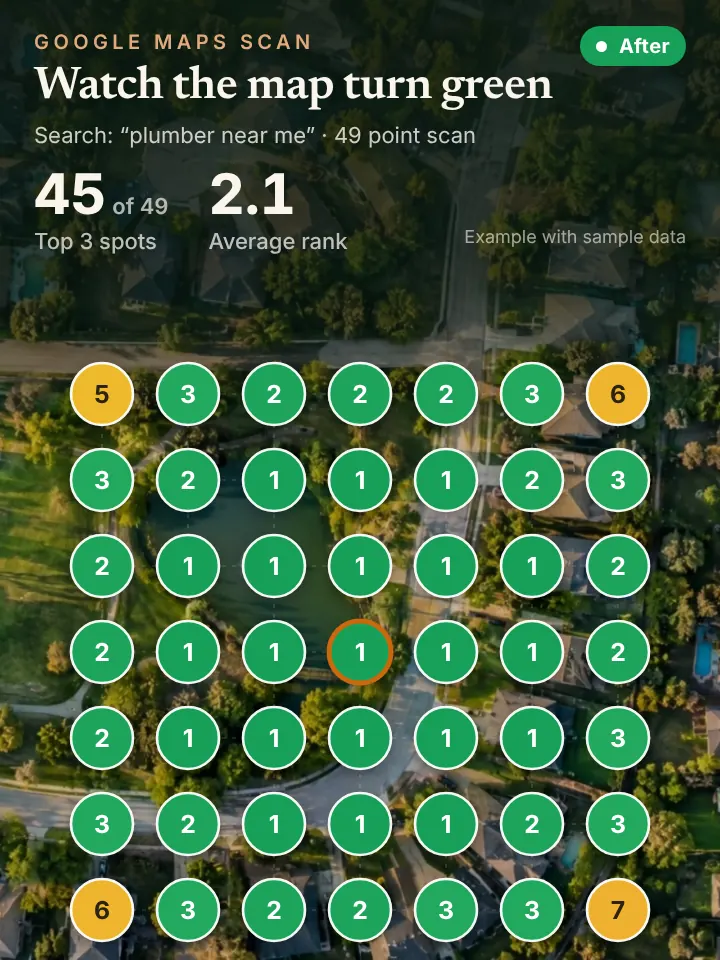
Once a month you get a short report with a 49 point grid scan showing where you rank across your service area. You see what was posted, which reviews came in and how your map coverage moved, without logging in to anything.
Why Wichita Profiles Go Stale and How Seasons Change the Work
Wichita owners are busy when the weather turns, and that is exactly when profiles fall behind. A spring of hail claims, a July of air conditioning calls or a January cold snap leaves no time for posting. By the time things calm down, months have passed without a single update.
Good management plans around the calendar. Before storm season we post about roof inspections and gutter checks; in late summer it is lawn aeration and sprinkler blowouts; ahead of winter it is furnace tune ups. Those posts match what people across Midtown, Old Town and the neighborhoods near Wichita State are actually searching for at that time of year.
Service area matters as well. A pest control company that covers Valley Center, Clearwater and the area near McConnell Air Force Base should say so plainly on the profile, with the address hidden if crews come to the customer.
How Profile Upkeep Supports AI Answers and Phone Coverage
AI assistants like ChatGPT and Gemini often lean on Google listings and reviews when someone asks who to call in Wichita. A profile that is accurate and active gives them better material to work with. That makes management a quiet foundation for AI visibility, not a separate chore.
An active profile also brings more calls. Pairing it with an AI receptionist means the extra calls are answered on the first ring, even when your whole team is out on jobs.
A Quick Wichita Profile Checkup You Can Do Today
Open your profile and read it as a stranger would. Are your hours right, including holidays? Does the services list include everything you do, and does the description mention the parts of the metro you cover?
Scroll to your photos and find the newest one. If it is more than a season old, take a few pictures on your next job. Then check the reviews tab and write a short, specific reply to anything still unanswered.
See Where Your Wichita Profile Stands
Request the AI Visibility Audit at peaklocalserviceleads.com/AIVisibilityAudit and we will review your profile, check your map coverage and see how AI assistants describe your business. You get a brief walkthrough video with what to fix first. There is no cost to request it.
Google Business Profile Management in Wichita: common questions
Where do I go to manage my Google Business Profile?
Sign in to the Google account that owns the profile and search your business name, or open Google Maps and go to your businesses. The edit panel appears right in the search results. If you manage several locations, the Business Profile Manager lists them together.
Does Google charge for a Business Profile?
No, Google does not charge to create or keep a Business Profile. What costs time is keeping it updated with posts, photos and review replies. That ongoing work is what management covers.
Do I need an LLC to have a Google Business Profile?
No, a sole proprietor can have a profile as long as the business serves customers in person, either at a location or by traveling to them. You do need to pass verification. A consistent business name and phone number make that easier.
Can someone manage my profile without owning it?
Yes, you can add a manager to your profile while you keep ownership. That lets us post, upload photos and draft replies while you stay in control. You can remove access at any time.
See where you stand on the map and in AI answers
We check how your business shows up across your service area on Google Maps and whether ChatGPT, Gemini and other assistants name you, then send you the findings with a short walkthrough video.
Request your AI Visibility Audit