Why Salt Lake City Profiles Go Stale
Google Business Profile management in Salt Lake City means someone keeps your listing current every week instead of setting it up once and walking away. Many owners in Utah built their profile years ago, added a logo and a phone number, and have not opened it since. Meanwhile Google keeps rewarding the competitors who post, add photos and answer reviews.
A stale profile is easy to spot. Hours that no longer match, a service list missing half of what you do, photos of a truck you sold and reviews sitting without a reply all tell customers nobody is minding the store. Google notices the same thing.
What Google Business Profile Management Covers
We handle the routine work so you can stay on jobs. That means a verified listing with the right primary and secondary categories, every service listed, your service area published with the address hidden if customers do not come to you, and a description that names your work and the parts of the valley you cover.
Each week we publish a post and add real photos from your jobs. We send review requests after completed work and write a response to every review, and nothing goes live until you approve it. When your hours, phone number or services change, we update them right away.
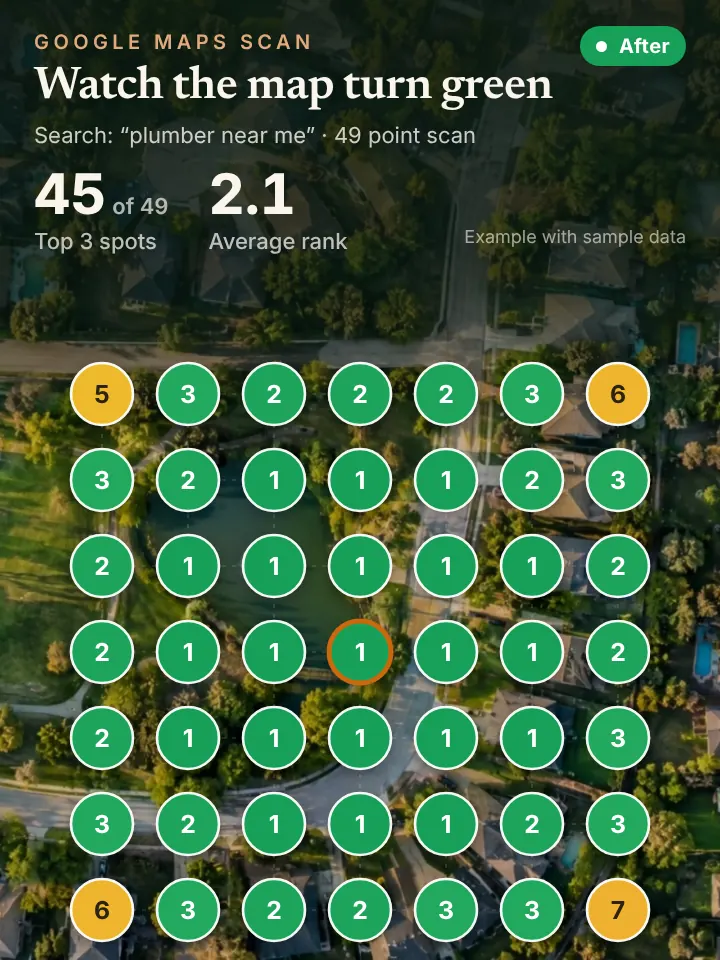
Every month you get a report with a 49 point grid scan, showing where your business ranks across your service area. It turns a vague feeling about whether the listing works into a map you can actually read.
Keeping a Salt Lake Profile in Step With the Seasons
Salt Lake City has real seasons, and your profile should follow them. A landscaping company in Millcreek should be posting about sprinkler startups in spring and blowouts before the first hard freeze. A heating and cooling company in Murray should show furnace tune ups in the fall and swamp cooler or air conditioning repair once summer heat sets in.
Holiday hours and storm days are other moments when a profile falls behind. If a customer in the Avenues calls during hours your listing says you are open and nobody answers, that is a poor first impression. Keeping those details right is a big part of what management means.
Neighborhood detail matters here too. Posts and photos tied to jobs in Sugar House, Rose Park, Glendale, Holladay and South Salt Lake show Google and customers exactly where you work, which supports your ranking across the city instead of just around your shop.
How a Managed Profile Supports Map Rankings, AI Search and Calls
Your profile is the foundation for everything else. It is the main thing Google uses to rank you on the map, and AI assistants such as ChatGPT, Gemini and Copilot pull from it, along with your reviews and other listings, when someone asks who to call.
When the profile starts bringing in more calls, each one needs an answer. Our AI receptionist responds on the first ring at any hour, books the job and passes the caller to a person when asked, so the extra attention becomes scheduled work.
Three Things to Check on Your Profile This Week
Sign in at business.google.com, or search your business name in Google while signed in, and open your profile. Confirm the hours, phone number, website link and categories are all correct.
Next, look at your services and photos. Are your main services listed with short descriptions? Do the photos show real jobs, your team and your trucks, and were any added in the last month?
Then check the reviews and the people with access. Reply to anything that has been waiting, and in the profile settings look at who holds owner or manager access. Former employees or a past marketing company sometimes still have it, and that is worth cleaning up.
Get Your AI Visibility Audit Before You Hand Off the Profile
Before you decide who should manage your listing, find out where it stands. Ask for the AI Visibility Audit on our site, peaklocalserviceleads.com/AIVisibilityAudit, for a no cost look at your Salt Lake City map rankings and what AI assistants currently say about your business.
You will get a short walkthrough video that shows what is working, what is missing and what we would do first. We work remotely from Lavon, Texas with service businesses across the country, including here in Utah.
Google Business Profile Management in Salt Lake City: common questions
Where do I go to manage my Google Business Profile?
Sign in to the Google account that owns the profile and search your business name, or go to business.google.com. The editing tools appear right in Search and in Maps. If you cannot find it, the profile may sit under a different account, often one created by a former employee or web designer.
Does Google charge for a Google Business Profile?
No, Google does not charge to create or keep a profile. What costs you is time: weekly posts, photos, review replies and updates. That ongoing work is what owners hand off when they choose a management service.
Do I need an LLC to have a Google Business Profile?
No. Google asks for a real business that serves customers in person, either at a location or by traveling to them, and you have to pass verification. A sole proprietor working under their own name can have a profile, as long as the business name matches how you present yourself to customers.
Will I lose control of my profile if someone manages it for me?
You should not. You stay the owner, and the manager is added with manager access. With us, posts and review responses come to you for approval before they go live.
See where you stand on the map and in AI answers
We check how your business shows up across your service area on Google Maps and whether ChatGPT, Gemini and other assistants name you, then send you the findings with a short walkthrough video.
Request your AI Visibility Audit