What Google Business Profile Management in Phoenix Involves
Google Business Profile management in Phoenix is the regular, hands on upkeep that keeps your listing current and competitive across the Valley. It covers posts, photos, reviews, service updates and a monthly look at how you rank. In a metro this size, with crowded categories like HVAC, pool service, roofing and solar, a listing that sits untouched for months slides down the results.
Many owners set up their profile once and have not touched it since. That is understandable when the summer is spent answering emergency AC calls from Glendale to Ahwatukee, but customers comparing listings notice which ones look alive.
Our Ongoing Management Process
We take on the routine work. Weekly posts highlight real jobs, seasonal services and the areas you cover. Fresh photos from your crews are added as you share them. Hours, services, categories and service area settings are reviewed and updated whenever your business changes.
Reviews get steady attention. We send review requests to recent customers and draft a reply to every review for you to approve before it posts. That keeps your public voice consistent without taking hours out of your week.
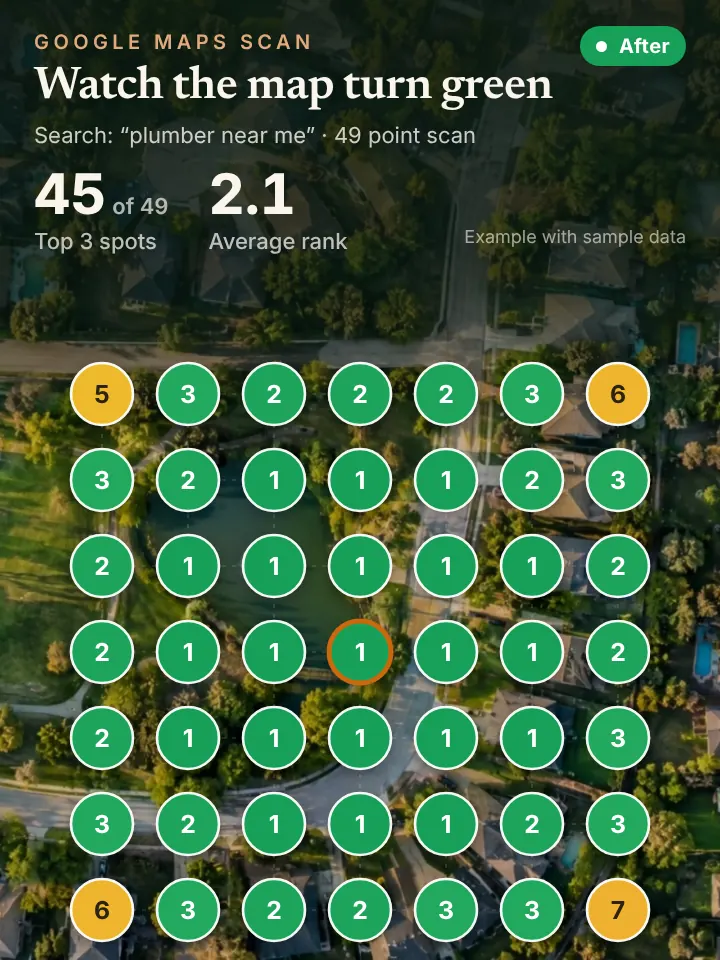
Each month you get a report built on a 49 point grid scan. It shows where you rank at points across your service area, so you can see at a glance whether the listing is reaching Scottsdale, Peoria or wherever else you want more work.
Why Phoenix Profiles Go Stale and What That Costs
Phoenix demand runs in strong seasons. Summer heat drives AC, pool and pest calls, monsoon season brings dust storms, roof damage and flooded streets, and winter brings seasonal residents who need landscaping, cleaning and handyman help. A profile that still shows last year's services or photos misses each shift.
The Valley's size makes stale listings even more costly. A company working from Arcadia to Desert Ridge, or from the Biltmore area out to Goodyear, competes with different businesses in each part of town. Without regular posts, photos and reviews that reflect that whole area, the listing tends to show up only close to home.
Other gaps creep in quietly: holiday hours never added, a new service never listed, a phone number that changed, or review replies that stopped. None of them seems urgent alone, yet together they make a profile look abandoned.
Access is another hidden issue. Profiles set up years ago by a former manager or a past agency sometimes leave the owner unable to make changes, and sorting that out comes before any regular management.
How Management Supports Rankings, AI Answers and Calls
An active profile is the base of strong Google Maps ranking and a key source for AI assistants answering local questions. As it brings in more calls during the summer rush, an AI receptionist can answer every one, so a homeowner in Tempe with a dead AC unit does not move on to the next listing.
Phoenix Profile Questions You Can Answer Today
Check your verification status first. If your listing shows as pending or unverified, it may not appear on Maps at all, so finishing verification comes before anything else. New listings can take some time to appear even after they are submitted, which is normal.
Then open your profile and look at hours, services, photos and recent reviews. Make sure you are the owner and that only people you trust have access. Search your main service from a few spots, like Encanto and Chandler, and see whether you appear.
Get an Outside Look at Your Phoenix Listing
If you want to know what to fix first, request the AI Visibility Audit at https://peaklocalserviceleads.com/AIVisibilityAudit. We review your profile, your map ranking around Phoenix and what AI assistants say about your business, then send a short walkthrough video. There is no cost.
Google Business Profile Management in Phoenix: common questions
How do I access my Google Business Profile manager?
Sign in to the Google account that owns or manages the listing and search for your business on Google or open it in Google Maps. The management tools appear on the listing itself. If you cannot see them, you may be signed into a different account.
How long does it take for a business to be added to Google Maps?
After you submit a listing and complete verification, it can take anywhere from a few days to a few weeks to appear. Some listings need extra verification steps, which can add time.
Is a Google Business Profile in Phoenix really no cost?
Yes, Google does not charge for the profile. What it takes is time to keep it current with posts, photos, review replies and updates, which is the part management services handle.
How can I check the status of my Google Business Profile verification?
Open your profile while signed in and look for a verification notice or status message. If verification is incomplete, Google will show the next step, such as a video check or a code.
See where you stand on the map and in AI answers
We check how your business shows up across your service area on Google Maps and whether ChatGPT, Gemini and other assistants name you, then send you the findings with a short walkthrough video.
Request your AI Visibility Audit