Why Indy Profiles Go Stale
Google Business Profile management in Indianapolis is the ongoing work of keeping your listing current after the setup is done. Plenty of local contractors claimed their profile years ago, added a logo, and have not touched it since.
Meanwhile things change. Hours shift for winter, a new service gets added, a crew starts covering Westfield or Brownsburg, and customers leave reviews that sit without a reply for months. A profile that looks abandoned tells both Google and homeowners that the business may be too.
What Google Business Profile Management Includes
We handle the routine so you do not have to. That covers weekly posts, fresh job photos, updates to services, hours and holiday schedules, and checks that nobody has suggested a wrong edit to your listing.
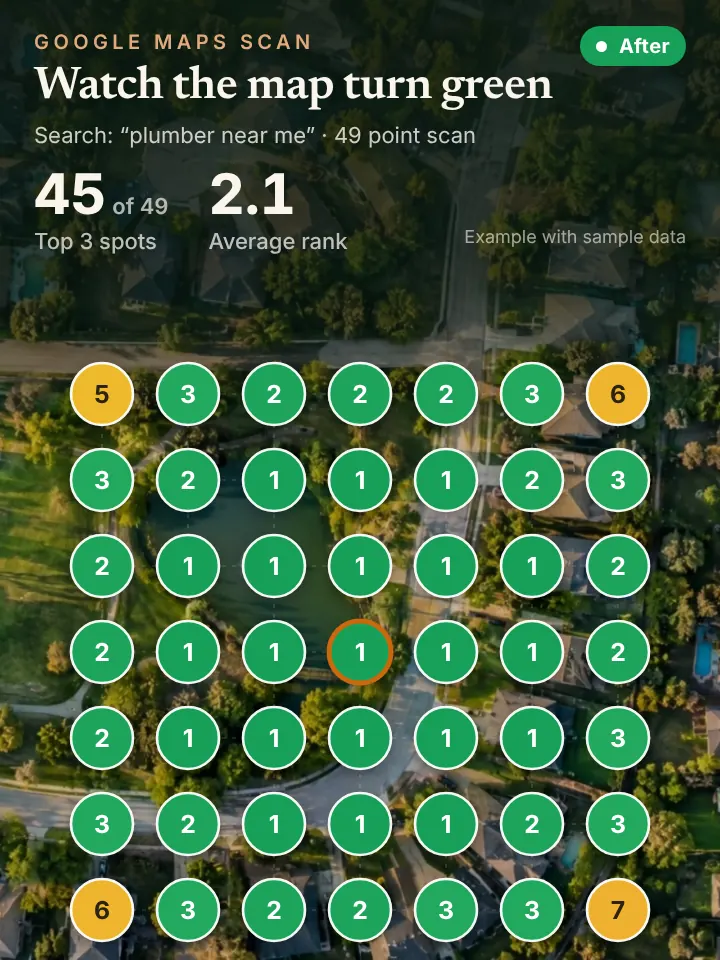
Reviews get attention too. We draft review requests you can send after a job and write responses to new reviews, and nothing is published until you approve it. Each month you get a short report along with a 49 point grid scan that shows where you rank across your service area.
Management also means watching the questions people ask on your listing and making sure answers are accurate. Small details like a missing holiday closure can send a customer to a locked door or an unanswered phone.
Keeping a Profile Current Through an Indiana Year
An Indianapolis service calendar has real swings. May brings race month crowds and spring storms, summer means air conditioning and lawn calls, fall is gutter and furnace season, and winter brings frozen lines from Lawrence to Franklin Township.
Good management follows that rhythm. A post about storm cleanup after a rough week near Broad Ripple or a photo of a furnace install in Meridian Hills reads as current and local, which is exactly what a person comparing three companies wants to see.
It also keeps the details tidy for different parts of the metro. If you serve Zionsville, Greenwood and Avon, your service area, services and photos should reflect that so people in each town recognize you as an option.
Plenty of Indy trades also change what they offer by season, such as adding holiday lighting in late fall or pausing pool work in winter. Updating the service list when that happens keeps the listing matched to what people are searching for that month.
How Profile Management Supports Maps, AI and Calls
An active profile is the foundation for ranking in the map pack. It is also a major source AI assistants draw on when someone asks ChatGPT or Perplexity for a trusted company in Indianapolis.
When the profile starts producing more calls, an AI receptionist can answer the ones you would otherwise miss, book the appointment, and hand off to a person whenever the caller asks.
Think of the profile as the storefront that everything else points back to. When it is accurate and active, every other piece of your marketing has a solid base.
Quick Profile Checks for Indianapolis Owners
Sign in to Google and search your business name, then use the edit option that appears for owners. Confirm your hours, phone number, website link and service list match what you actually offer today.
Scroll to your reviews and count how many have no reply. Then look at your photo dates; if the newest picture is more than a season old, add a few from recent jobs in neighborhoods like Fountain Square or Castleton.
While you are in there, check whether the description still matches your business. If it was written when you only did repairs and you now handle full installs across Hamilton County, it is time for a rewrite.
Get a No Cost Look at Your Listing
Want to know how your profile stacks up before you hand anything off? Request the AI Visibility Audit on peaklocalserviceleads.com/AIVisibilityAudit and we will review your map presence and your AI answers, then send a short walkthrough video.
We are a remote team based in Lavon, Texas serving local businesses nationwide, including across central Indiana. There is no obligation, just a clear view of what to fix.
Google Business Profile Management in Indianapolis: common questions
Where do I go to manage my Google Business Profile?
Sign in with the Google account that owns the profile, then search your business name or open Google Maps. The owner controls appear right in the search results, where you can edit info, add photos and reply to reviews.
Does Google charge for a Business Profile?
Google does not charge to create or keep a Business Profile. What costs time is keeping it current, which is why many Indianapolis owners hand the weekly work to a manager.
Do I need an LLC to have a Google Business Profile?
No. Google asks that you are a real business that serves customers in person or at their location, whether you are a sole proprietor or a larger company. Your name, phone and service area should match how you actually operate.
How do I see who manages my Google Business Profile?
Open the profile settings and look for the people and access area. It lists owners and managers, and an owner can remove anyone who no longer needs access, such as a former employee or past agency.
See where you stand on the map and in AI answers
We check how your business shows up across your service area on Google Maps and whether ChatGPT, Gemini and other assistants name you, then send you the findings with a short walkthrough video.
Request your AI Visibility Audit