Why Albuquerque Profiles Go Stale
Google Business Profile management in Albuquerque means someone keeps your listing current every week instead of setting it up once and walking away. Most owners in the Duke City built their profile years ago, added a logo and a handful of photos, and have not touched it since. Meanwhile hours changed, services expanded and the newest review is from a season nobody remembers.
Google notices. A listing with fresh photos, recent posts and reviews that get answered looks like an open, busy company. A listing that has gone quiet looks like one that might have closed, and it tends to slip in the map results across the Northeast Heights, Nob Hill and the North Valley while more active competitors move up.
What Google Business Profile Management Includes
We handle the profile as an ongoing job. That covers checking your categories and service list, keeping hours right through holidays and the Balloon Fiesta crush in October, adding real job photos, and publishing a post every week about a service, a seasonal tip or a recent project. If Google or a stranger suggests an edit to your listing, we catch it and fix it before it confuses customers.
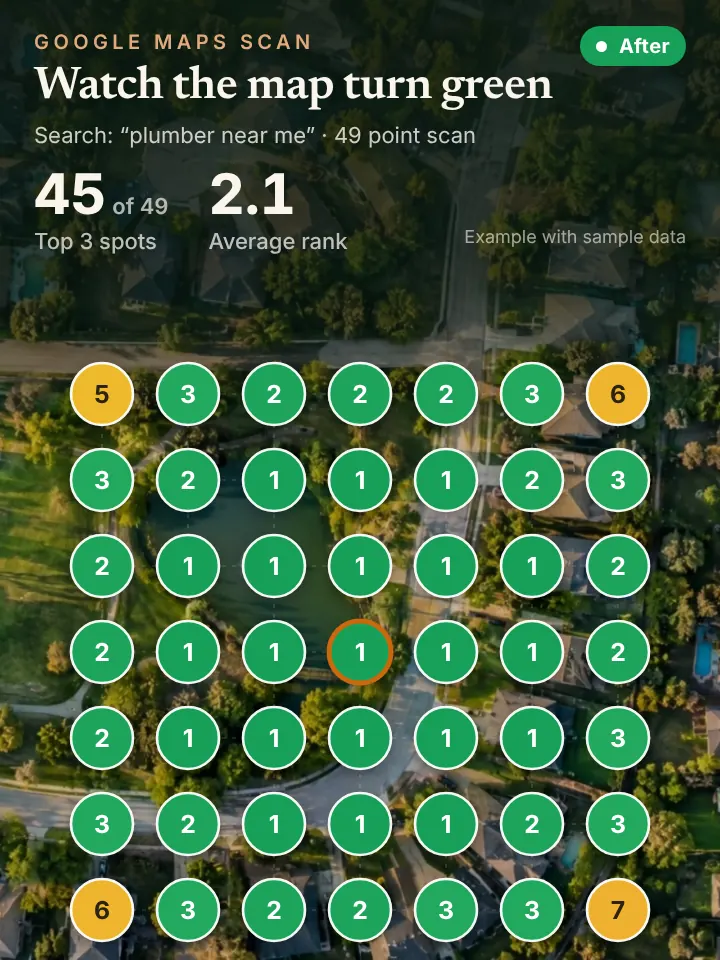
Reviews get the same care. We draft review requests you can send after each job and write replies to every new review, and nothing is published until you approve it. Each month you get a report with a 49 point grid scan showing where you rank across your service area, so you can see whether the work is moving the map.
Managing a Listing Across Albuquerque and the Metro
Albuquerque is wide, and a single profile has to speak to very different parts of it. A heating company may get its steadiest calls from older homes around Nob Hill and the university, while a landscaper does most of its work in Four Hills and the foothills under the Sandia Mountains. Your posts and photos should reflect the places you actually want more work.
Then there are the towns around the city. If you cover Corrales, Los Ranchos, Tijeras or Bernalillo, those names belong in your service area and in the way your posts and replies describe jobs. A review that says a crew fixed a well pump out in Tijeras tells Google and future customers far more than a generic thank you.
The calendar here is predictable, which makes management easier to plan. Spring wind brings fence and roof calls, summer is evaporative cooler and refrigerated air season, the monsoon tests gutters and drainage, and winter cold snaps freeze pipes up in the East Mountains. A managed profile gets ahead of each season instead of reacting to it.
How Profile Management Supports Maps, AI and Your Phones
A well kept profile is the foundation for everything else we do. It is the main thing Google uses to rank you in the map pack, and it is one of the sources AI assistants draw on when someone asks ChatGPT or Gemini for a reliable contractor in Albuquerque.
When those efforts work, the phone rings more. An AI receptionist answers on the first ring day or night, says it is an assistant, books the appointment and passes the caller to you when they want a person.
Quick Profile Checks for Albuquerque Owners
Sign in at business.google.com, or search your business name while logged in to the Google account that owns it, and the management panel appears right in the search results. Confirm your primary category is the service you most want to be found for, and read your description out loud to make sure it names what you do and where.
Then scroll to your photos and reviews. If the newest photo shows a truck you sold or the newest review has no reply, start there. Check the list of people with access too, because former employees and old agencies often still have owner or manager rights.
Request Your Albuquerque Profile Review
Want to know how your listing compares before you hand anything off? Request the AI Visibility Audit at peaklocalserviceleads.com/AIVisibilityAudit. It is a no cost review of your Google Business Profile, your map rankings across Albuquerque and what AI assistants say about you, with a short walkthrough video. We are based in Lavon, Texas and work with New Mexico companies remotely.
Google Business Profile Management in Albuquerque: common questions
Where do I go to manage my Google Business Profile?
Search your business name on Google or open Google Maps while signed in to the account that owns the listing, and the editing tools show up directly. You can also go to business.google.com. If you cannot see edit options, you are probably signed in with the wrong account.
Does it cost anything to have a Business Profile on Google?
No. Google does not charge to create or keep a Business Profile. Paid options exist, such as ads, but the listing itself costs nothing, and management is about the time it takes to keep it current.
Do you need an LLC to have a Google Business Profile?
No. Sole proprietors and partnerships can have a profile as long as the business is real and serves customers in person, either at a location or at the customer's home. Use the name customers actually know you by, without stuffing extra keywords into it.
How do I make someone a manager on my Google Business Profile?
From the profile menu, open the business profile settings, choose people and access, and add the person by email as a manager or owner. Managers can edit the listing and reply to reviews. Owners can also add or remove other users, so keep that role for yourself.
See where you stand on the map and in AI answers
We check how your business shows up across your service area on Google Maps and whether ChatGPT, Gemini and other assistants name you, then send you the findings with a short walkthrough video.
Request your AI Visibility Audit