What Google Business Profile Management in Sioux Falls Actually Covers
Google Business Profile management in Sioux Falls means someone keeps your listing current every week, so the panel customers see on Google Search and Maps reflects the company you run today. Most owners set up the profile once, maybe years ago, and then leave it alone while they run crews and chase invoices.
Google notices that silence. A listing with old photos, no recent posts and unanswered reviews looks less active than one that changes every week, and customers notice it too. Management fills that gap without adding another chore to your week.
Think of it like maintaining a work truck. Nobody notices regular oil changes, but skip them for a year and the problems pile up at the worst possible moment.
Our Monthly Routine for Sioux Falls Profiles
Each week we publish a post about a recent job, a seasonal reminder or a service you want more of. We upload real photos you send from the field, keep hours and holiday closures accurate, and watch for edits that Google or the public make without asking you.
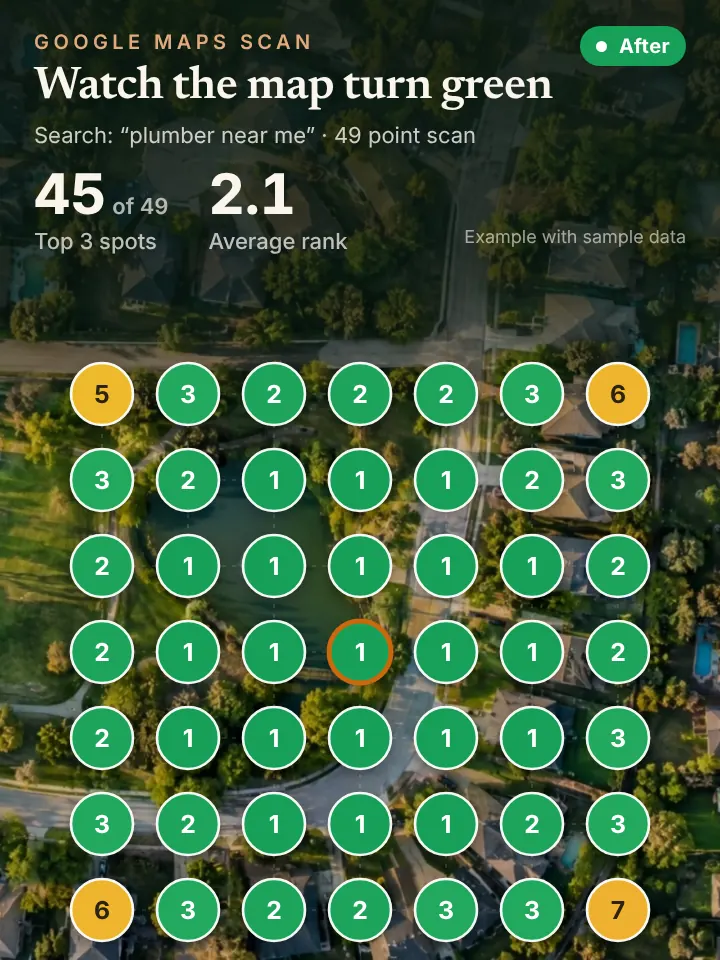
When reviews come in, we write a reply that sounds like you and send it over for approval before anything goes live. We also draft the review request messages you send after a finished job. Once a month you get a report built around a 49 point grid scan from Local Falcon, so you can see your Google Maps ranking across your whole service area instead of one spot.
Why Profiles Around Sioux Falls Go Stale
Seasons change fast on the plains, and listings rarely keep up. A landscaper switches to snow removal in November, a heating company adds air conditioning tune ups in May, and a roofer gets slammed after a June hailstorm, yet the profile still says the same thing it did last year.
Ownership drift is the other problem. A former employee or an old marketing vendor sometimes still controls the listing, and the owner has no idea who has access. We help you confirm who the owners and managers are, remove people who no longer belong, and make sure you keep primary ownership.
Location detail matters too. A company working homes in Pettigrew Heights, around McKennan Park and out to Renner, Crooks and Lennox should say so in its service area and posts, not just list the city name.
Where Profile Work Meets Maps, AI and Phone Calls
A well kept profile is the foundation for map pack visibility, and it is also one of the main sources AI assistants read when someone asks for a local recommendation. Keeping it fresh helps on both fronts at once.
Better visibility means more calls, and some of those arrive at dinner time or during a storm. Our AI receptionist can answer them on the first ring, book the appointment and pass the caller to you when they want a person.
Reviews deserve special mention. A reply that thanks a customer by first name and mentions the job, such as a water heater swap in Brandon, reads as genuine to the next person browsing and gives Google one more signal about what you do and where.
Profile Checks You Can Make From Your Phone Today
Sign in at business.google.com or search your company name while logged into Google, and the management panel should appear right on the results page. Open the people and access settings and read the list of owners and managers. Anyone you do not recognize deserves a closer look.
Then scroll your own listing as a customer would. Look at the date of your last post, the age of your newest photo and whether every review has a response. If your hours still show summer times in the middle of winter, that is the first thing to fix.
Ask for an AI Visibility Audit of Your Listing
We put together a no cost review called the AI Visibility Audit, and you can request it at https://peaklocalserviceleads.com/AIVisibilityAudit. It looks at your Sioux Falls profile, your spot on the map across the city, and how AI assistants describe your business.
A short walkthrough video comes with it, pointing out the gaps we would close first. You can use it to fix things yourself or hand the work to us.
Google Business Profile Management in Sioux Falls: common questions
Where do I go to manage my Google Business Profile?
Search your business name on Google while signed in to the account that owns it, or visit business.google.com. The editing tools appear right in the search results. If you cannot get in, the listing may belong to a different account, and ownership can be requested through Google.
What is Google My Business called now?
Google renamed Google My Business to Google Business Profile. The listing, reviews and map placement work the same way, and older guides that say GMB are describing the same thing.
Does it cost anything to have a Google Business Profile?
Creating and keeping a profile on Google costs nothing. What takes effort is keeping it current with posts, photos and review replies, which is the part most Sioux Falls owners hand off to a manager.
How do I know who has access to my listing?
Open the profile settings and look for the people and access section. It lists every owner and manager by email. Remove anyone who should not be there and keep primary ownership on an account your company controls.
See where you stand on the map and in AI answers
We check how your business shows up across your service area on Google Maps and whether ChatGPT, Gemini and other assistants name you, then send you the findings with a short walkthrough video.
Request your AI Visibility Audit