Why Seattle Listings Need Ongoing Care
Google Business Profile management in Seattle is less about a one time setup and more about keeping pace with a market that never sits still. New competitors open in Greenwood and Columbia City every season, customers expect current photos and quick replies, and Google keeps adjusting what a profile can show. A listing nobody touches slowly slides behind.
Busy owners know they should post and reply to reviews, but between jobs in Magnolia and estimates in the University District, the profile is the first task to slip. That is the gap ongoing management fills.
What Our Google Business Profile Management in Seattle Covers
We start by confirming the listing is verified and correct: categories, services, hours, phone, website and a service area that reflects where you work. Service area businesses keep their address hidden from the public listing.
Then the routine begins. Each week we publish a post and add real job photos you share with us. We send review requests after completed work and write responses to new reviews, which you approve before anything is published. Updates for holidays, new services or changed hours are handled as they come up.
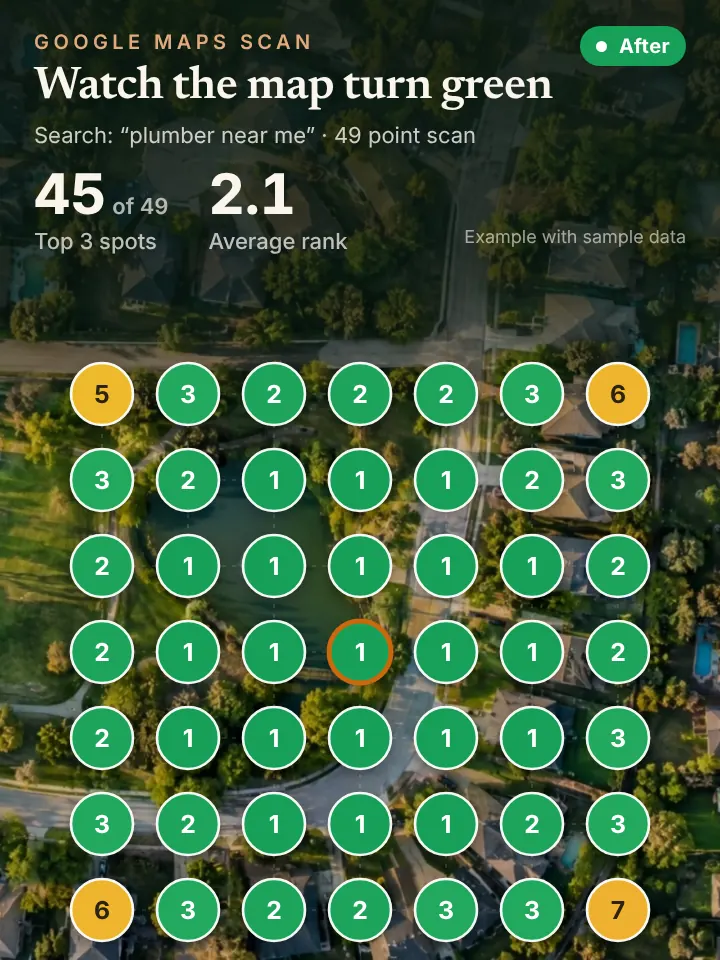
Once a month we send a short report. Its centerpiece is the 49 point grid scan, run in Local Falcon, so you can see your rank across your area and judge progress instead of taking it on faith.
We also keep an eye on suggested edits. Google sometimes accepts changes from the public, like a wrong phone number or new hours, and catching those quickly protects you from calls that go nowhere.
Managing a Profile Across Seattle and the Eastside
Many Seattle service companies work well beyond the city line. A contractor might cover Redmond and Kirkland on the Eastside, Renton and Federal Way to the south, and Lynnwood or Edmonds to the north. The profile should name those areas clearly while staying accurate about where you travel.
Seasonal content writes itself here. Fall means gutter cleaning and roof checks before the rain settles in, winter brings windstorm tree work and the occasional snow day that shuts the hills, and spring is moss removal and pressure washing. Posts and photos tied to those moments look current to customers and to Google.
Industrial neighborhoods like Georgetown and Sodo also have plenty of commercial clients who search on Google before calling a vendor, so a clean, active listing matters for business to business work as well.
Rental owners are another big audience. Property managers juggling apartments on Capitol Hill and houses on Beacon Hill often pick vendors straight from Google, judging them by recent photos and how quickly reviews get a reply. A managed profile shows your work at its strongest to those repeat customers.
How Profile Management Supports Maps, AI and Calls
Think of the profile as the source document. Map rankings depend on it, and AI tools quote from it when a Seattle resident asks who installs heat pumps or clears gutters nearby.
When the extra visibility turns into extra calls, our AI receptionist can catch the ones that come in while you are on a ladder in Wallingford, booking them straight onto your calendar.
Things You Can Check on Your Seattle Listing Now
Make sure you still control the Google login attached to your listing, and look at who else has been granted access. Remove former staff or vendors you no longer use.
Search your business on Google and check the verification status in the management panel. Confirm your hours, phone and website are right, and look at the last time a photo or post went up.
Finally, scroll through your reviews. Any that are unanswered are an easy win, and a pattern of complaints is worth addressing in the business itself, not just in the replies.
Request Your AI Visibility Audit
If you are weighing whether to hand off your listing, start with facts. The AI Visibility Audit, requested through peaklocalserviceleads.com/AIVisibilityAudit, reviews your profile, grid ranking and AI mentions and returns a narrated video, without any charge.
Peak Local Service Leads is a Lavon, Texas company. Seattle clients work with us entirely online, approving posts and replies from wherever they happen to be.
Google Business Profile Management in Seattle: common questions
How do I access my Google Business Profile manager?
Sign in to the Google account that owns the profile, then search your business name on Google or open Maps. The management tools show up directly on the results page for owners and managers.
How can I check my verification status?
Open the profile from the account that owns it. If it still needs verification, Google shows a prompt with the next step. A verified profile shows its management options without that prompt.
What do I actually get with a Google Business Profile?
A listing on Google Search and Maps with your services, hours, photos, reviews, posts and contact options. When it is complete and active, it becomes one of the main ways Seattle customers find and judge you.
Will you post replies to reviews without asking me?
No. We draft responses and you approve them before they go live. You always have the final word on what appears on your listing.
See where you stand on the map and in AI answers
We check how your business shows up across your service area on Google Maps and whether ChatGPT, Gemini and other assistants name you, then send you the findings with a short walkthrough video.
Request your AI Visibility Audit