What Google Business Profile Management in Portland, OR Covers
Google Business Profile management in Portland, OR is the routine care that keeps your listing accurate, active and trusted month after month. Customers in Milwaukie, Oregon City or Montavilla judge you by that profile long before they visit your website. If it looks abandoned, they move on.
Most owners know this but run out of hours. Between jobs, estimates and invoices, posting updates and answering reviews ends up at the bottom of the list. Management takes that list off your plate.
Our Monthly Routine for Portland Profiles
Each week we publish a post about a service, a seasonal tip or a recent kind of job. We add fresh photos from your work, keep your hours accurate for holidays and closures, and adjust your service list when you add or drop a line of work.
For reviews, we give you simple request messages to send customers and draft a reply to every review that comes in. You approve each one before it posts, so the voice stays yours.
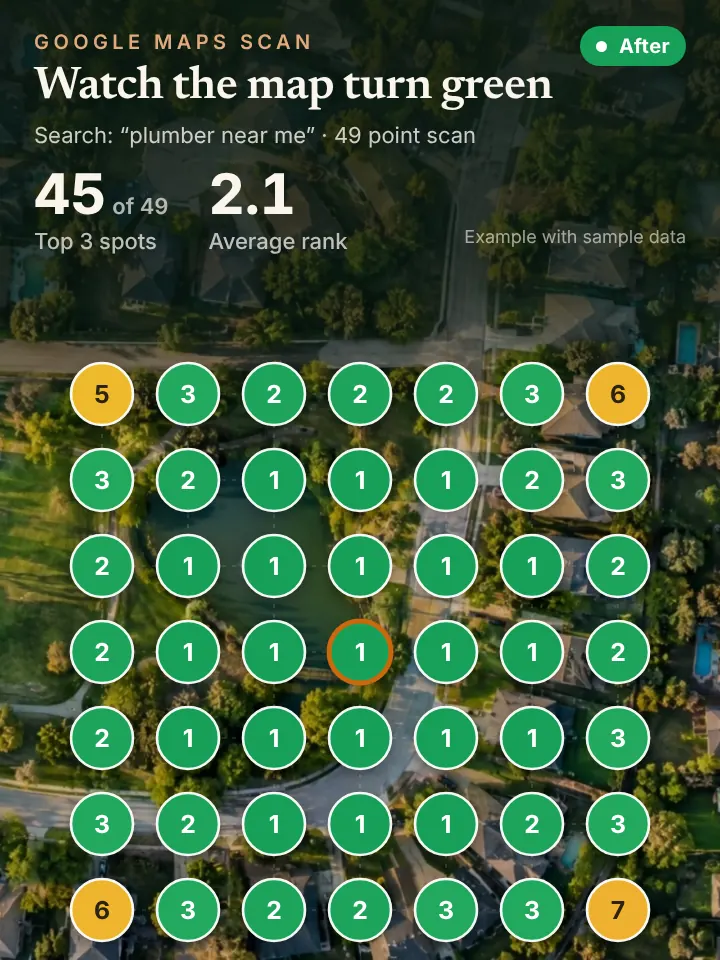
Once a month you receive a short report with a 49 point grid scan from Local Falcon, showing how the listing ranks around your service area. It is an easy way to see whether the effort is moving the map.
Why Portland Listings Fall Behind
Listings around Portland often fall behind in quiet ways. A business moves its shop from Clackamas to Tualatin and the map pin never changes. A crew starts offering heat pump installs but the profile still lists only furnace repair. Photos stay stuck on the first season in business.
The calendar matters too. Fall and winter rains bring gutter, roofing and drainage calls, spring brings yard and exterior work, and summer heat waves push cooling repairs. A managed profile shifts its posts and services with those seasons, while a neglected one stays frozen.
Ownership is another snag. Some Portland owners discover a former partner, an old agency or a past employee still controls the listing. We help you confirm who has access and keep control with the business.
How Management Supports Rankings, AI Search and Calls
An active profile is what Google Maps ranking is built on, and it feeds AI assistants as well. When someone asks Copilot or Perplexity for a reliable handyman in West Linn, profile details and reviews help shape the answer.
More attention from search means more calls. An AI receptionist answers every one on the first ring and books the job, so new visibility actually turns into scheduled work.
Think of the three as one chain. The profile earns the listing a place in front of customers in Laurelhurst or Clackamas, AI tools repeat what the profile and reviews say, and the receptionist makes sure the resulting calls do not drop. Weakness at any link costs jobs, so keeping the profile healthy is where the chain starts for most Portland service companies.
A Short Checklist for Portland Owners
Open your profile and check the access list. Make sure you are the primary owner and remove anyone who no longer works with you. Then confirm your phone number, hours, website link and service area are all correct.
Look at the date of your last post and newest photo. If either is several months old, add something this week. Finally, reply to any review that has been sitting without a response, keeping it short and specific to the job.
Request a Portland AI Visibility Audit
If you want to see where your profile stands, request the AI Visibility Audit. It costs nothing and shows your ranking across Portland, what AI assistants say about you, and comes with a short walkthrough video.
Go to the AI Visibility Audit page at peaklocalserviceleads.com/AIVisibilityAudit. Peak Local Service Leads manages profiles remotely from Lavon, Texas for businesses across Oregon.
Google Business Profile Management in Portland: common questions
Where do I go to manage my Google Business Profile?
Sign in to the Google account connected to the listing, then search your business name on Google or open it in Google Maps. The editing options appear on the profile. If you cannot find it, the listing may belong to another account.
Does it cost money to have a Google Business Profile?
Google does not charge for the listing. The real cost is the time it takes to keep it current, which is the part management handles.
Do I need an LLC to have a Google Business Profile?
Not necessarily. Google looks for a real business that serves customers in person, whether at a location or across a service area. You need to be able to verify the business, but the legal structure itself is not the deciding factor.
Will I lose control of my profile if you manage it?
No. You stay the primary owner, and we work as a manager on the listing. You approve review replies, and you can remove access at any time.
See where you stand on the map and in AI answers
We check how your business shows up across your service area on Google Maps and whether ChatGPT, Gemini and other assistants name you, then send you the findings with a short walkthrough video.
Request your AI Visibility Audit