Why Google Business Profile Management in Oklahoma City Matters
Google Business Profile management in Oklahoma City is the ongoing care of the listing customers see before they ever call you. Setting up a profile takes an afternoon, but keeping it current through hail season, holiday hours, new services and a steady stream of reviews takes attention most owners do not have. When the profile goes quiet, Google tends to favor competitors who keep theirs active.
Across a metro that runs from Edmond down to Norman and out to Yukon and Midwest City, homeowners compare a handful of listings in seconds. Fresh photos, recent posts and thoughtful review replies are often what tip that decision.
What Done for You Management Includes
We handle the routine work every month. That means weekly posts about your services and seasonal offers, new photos from real jobs, updated hours for holidays and weather closures, and service lists that match how OKC customers actually search.
Reviews get the same attention. We prepare review requests you can send after each job and draft responses to every new review, positive or negative, for your approval. Nothing is published without you seeing it first.
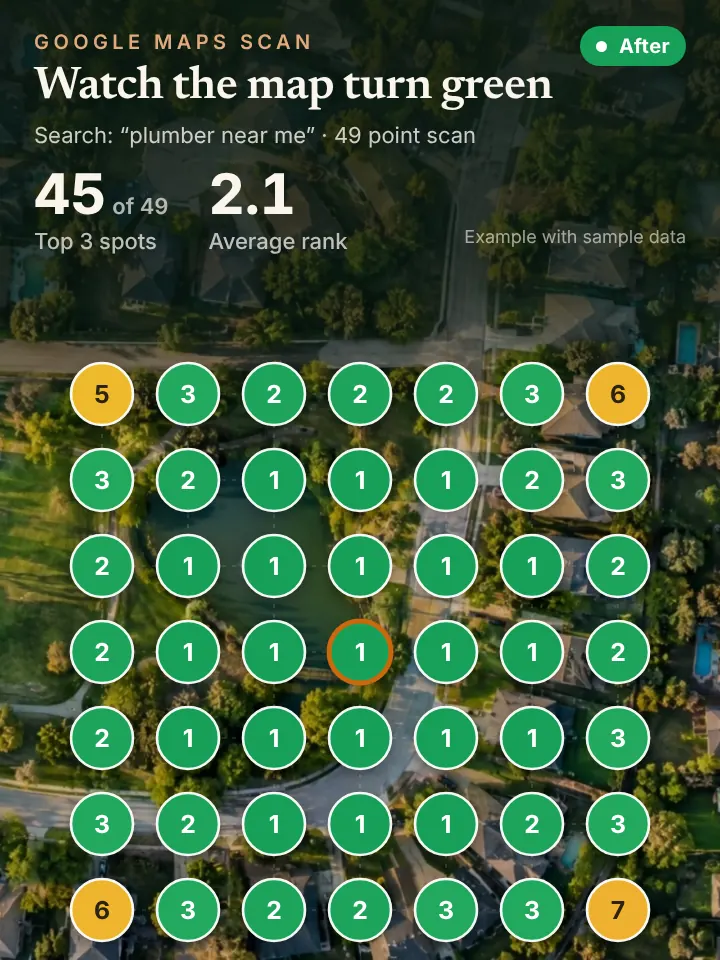
At the end of each month you get a short report that includes a 49 point grid scan from Local Falcon. It shows where your profile ranks across your service area, so you can see whether neighborhoods like Nichols Hills or Del City are turning green.
Why Oklahoma City Profiles Go Stale
Most stale profiles in OKC share the same story. Someone set the listing up years ago, maybe a former office manager or an old marketing vendor, and nobody has logged in since. The photos show a truck you sold, the hours ignore the winter schedule, and a few reviews from the last ice storm never got a reply.
Access is often the first thing we sort out. Owners are surprised to learn they are not the primary owner of their own listing, or that a past employee still has manager rights. We help you confirm who has access and make sure the business keeps control.
Seasonal swings make upkeep harder here. Spring storms bring a rush of roofing, siding and restoration work, summer heat drives air conditioning repair, and winter brings frozen pipes. A managed profile reflects those shifts with posts and services, while an untouched one looks the same all year.
How Profile Care Supports Maps, AI Answers and Your Phones
A well kept profile is the backbone of Google Maps ranking, and it also shapes what AI assistants say when someone asks for a local recommendation. Those answers lean on profile details, reviews and consistent listings elsewhere.
When the profile starts bringing in more calls, every call needs an answer. Pairing management with an AI receptionist means a caller from Moore at nine at night still reaches someone who can book the job.
Quick Checks for Oklahoma City Owners
Sign in to your profile and look at the list of people with access. Remove anyone who should not be there and confirm you are listed as the primary owner. If you cannot find the profile at all, that is worth fixing before anything else.
Next, scroll your photos and posts. If the newest photo is more than a season old or the last post mentions a promotion that ended, the listing is signaling neglect. Finally, count unanswered reviews and reply to each one in plain language.
Get Your Oklahoma City AI Visibility Audit
Want a clear picture of your listing before deciding anything? Request the AI Visibility Audit, which costs nothing. We check where your profile ranks across OKC and what AI assistants say about your business, then send a short walkthrough video with what we found.
Request it on the AI Visibility Audit page at peaklocalserviceleads.com/AIVisibilityAudit. Peak Local Service Leads is based in Lavon, Texas and manages profiles for Oklahoma businesses remotely.
Google Business Profile Management in Oklahoma City: common questions
How do I get into my Google Business Profile Manager?
Sign in to the Google account that owns or manages the listing, then search for your business name on Google or open Google Maps and choose your profile. The editing tools appear right there. If no account you control has access, you can request ownership through Google.
Does it cost anything to have a Google Business Profile?
No, Google does not charge for the profile itself. What takes time is keeping it accurate and active month after month, which is what management covers.
How long does it take for a new business to show on Google Maps?
Once verification is complete, a new listing can appear fairly soon, though timing varies. Verification steps differ by business, and ranking well for competitive searches in Oklahoma City takes longer than simply appearing.
Who has access to my Google Business Profile?
Open the profile settings and look for the people and access section. It lists owners and managers by email. It is common to find former employees or past vendors there, and cleaning that up protects the listing.
See where you stand on the map and in AI answers
We check how your business shows up across your service area on Google Maps and whether ChatGPT, Gemini and other assistants name you, then send you the findings with a short walkthrough video.
Request your AI Visibility Audit