Why Google Business Profile Management in Houston Matters
Google Business Profile management in Houston keeps your listing on Google Search and Maps accurate, active and trusted, without the owner spending evenings updating it. In a metro this large, with this many competitors in every trade, a stale listing gets passed over quickly.
Most Houston owners set up their profile once and move on to running the business. Months later, the photos are old, the hours are wrong after a schedule change, and a stack of reviews sits unanswered. Customers notice, and so does Google.
What Steady Profile Management Looks Like Here
Every week we publish a post about a recent job, a seasonal tip or a service you want to grow. We upload real photos you send from the field, keep hours and holiday closures correct, and check that categories and services still match what you sell.
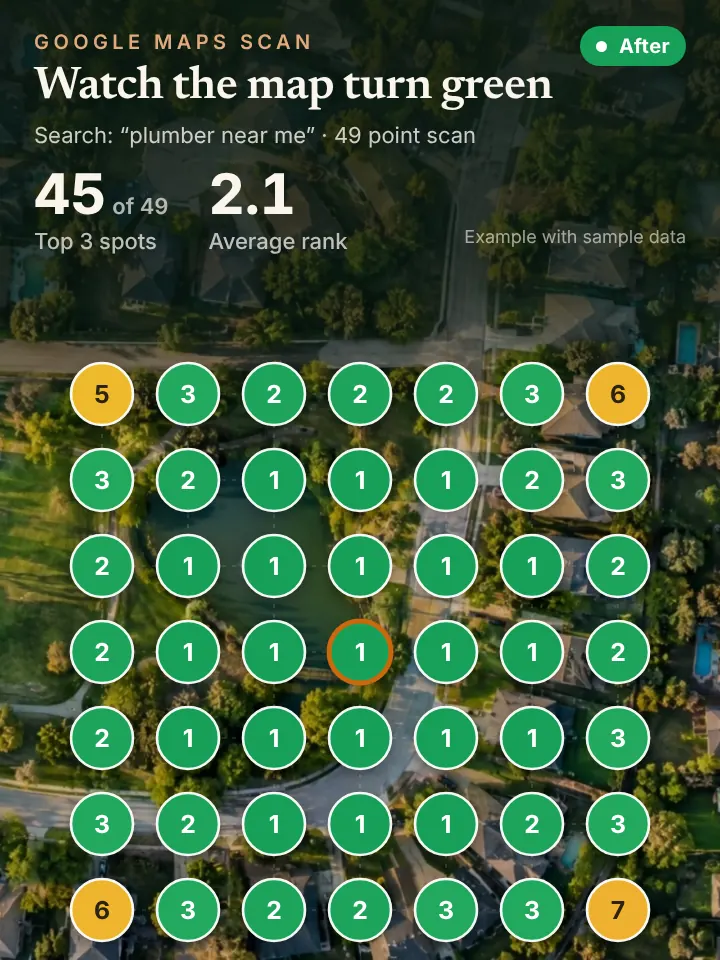
Reviews get a written reply in your voice, sent to you for approval before posting. We also prepare review request messages to send after finished jobs. Each month you receive a report built around a 49 point grid scan from Local Falcon, showing your position across your whole service area instead of one address.
Think of us as the person who never forgets the listing exists. Bayou City owners have enough on their plate, and a profile that changes every week quietly tells both Google and customers that the company behind it is open, busy and paying attention.
Houston Weather, Sprawl and Why Profiles Go Stale
Weather changes Houston businesses overnight. During hurricane season or after a heavy flood, a restoration company may run around the clock, a roofer may stop taking small repairs, and an HVAC shop may change its hours. Customers check the profile first, so it needs to reflect those changes the same day.
The size of the city creates its own drift. A plumber who started in the Heights and Montrose may now work in Katy, Sugar Land, Pearland and Cypress, while the service area still lists only the inner Loop. A pest control company may cover Kingwood and Humble without a single post or photo from there.
Access problems are common too. A former office manager or an old agency may still control the listing. We help you confirm who owns and manages the profile and keep primary ownership with your company.
How Profile Work Ties Into Maps, AI and Calls
A current profile is the foundation of your map pack position. It is also one of the main sources AI assistants read when someone asks for a Houston recommendation, so steady management pays off in both places.
As visibility improves, the phone rings more, often during a storm or late in the evening. Our AI receptionist answers on the first ring, books the job and transfers callers to you when they ask for a person.
Profile Checks Houston Owners Can Do Today
Sign in to the Google account that owns your listing and search your business name. Open the people and access settings and make sure every owner and manager is someone you recognize. If a former employee is listed, remove them.
Next, read your listing as a customer would. Check whether your hours match reality, whether your service area covers places like Clear Lake, Spring Branch or The Woodlands if you work there, and whether your last post is recent. Answer any review still waiting for a reply.
Finally, add a fresh photo from a job this week. Real images of your crew and work in Houston homes are one of the simplest signals that a business is active.
Ask for Your AI Visibility Audit
We offer a no cost AI Visibility Audit for Houston businesses at https://peaklocalserviceleads.com/AIVisibilityAudit. It reviews your profile, shows your map position across the metro and checks what AI assistants say about your company.
A short walkthrough video comes with it, laying out what we would fix first. Whether you handle those fixes yourself or hand them to us is your call.
Google Business Profile Management in Houston: common questions
How do I open my Google Business Profile manager?
Sign in to the Google account that owns the listing and search your business name, or go to business.google.com. The management tools appear right on the results page. If they do not, the listing likely belongs to another account.
How long until a new Houston business appears on Google Maps?
A new profile usually has to be verified before it shows publicly. Some verifications go through quickly, while others take longer, especially if Google requests a video or documents. Keep your details consistent everywhere while you wait.
Who has access to my Google Business Profile?
Open the people and access section in your profile settings to see every owner and manager. Remove anyone who no longer works with you, and keep primary ownership on an account your company controls.
Should I update my profile during a hurricane or flood?
Yes. If your hours change, you pause certain services or you add emergency work, update the profile and post about it. Customers often check Google before calling, and accurate information saves everyone time.
See where you stand on the map and in AI answers
We check how your business shows up across your service area on Google Maps and whether ChatGPT, Gemini and other assistants name you, then send you the findings with a short walkthrough video.
Request your AI Visibility Audit