Why Google Business Profile Management in Chicago Pays Off
Google Business Profile management in Chicago keeps your listing current so it keeps winning calls week after week. A renter in Wicker Park or a homeowner in Beverly decides quickly, often by looking at photos, recent reviews and whether you seem open. A neglected listing loses that comparison.
Profiles go stale easily. Owners set them up, then get buried in winter emergencies or summer work and stop posting. Months pass with no photos and unanswered reviews while competitors keep updating theirs.
What Done for You Management Covers
We handle the steady upkeep. Every week we publish a post tied to your work, upload real photos from jobs around the city and draft replies to new reviews for you to approve. We also write review request messages you can send when a job wraps up.
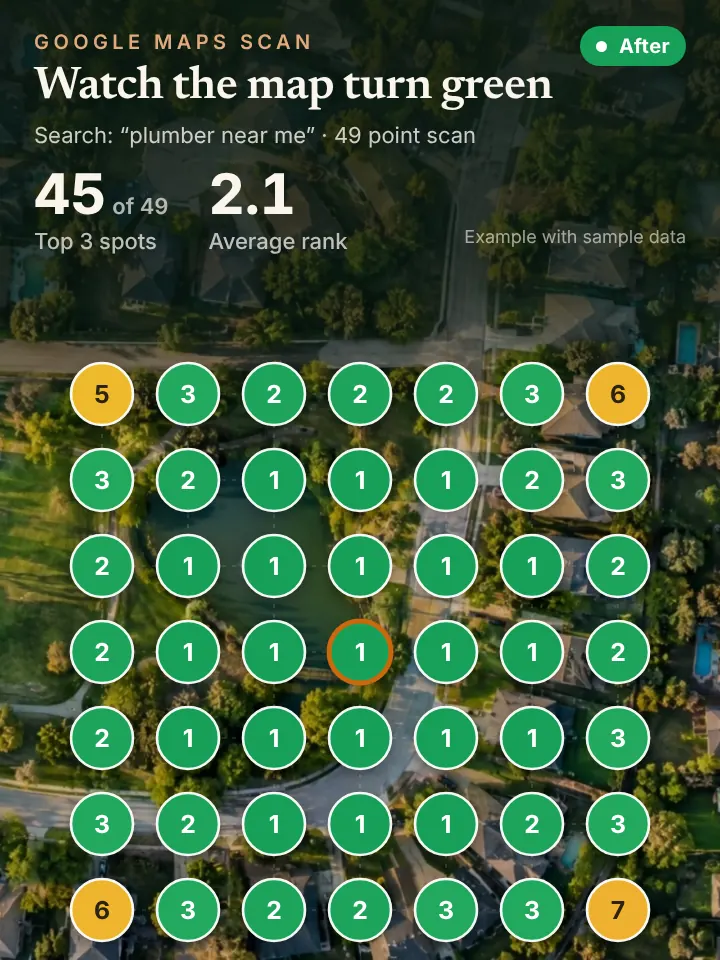
We keep services, hours and categories accurate, always with your approval first. Each month you get a report including a 49 point grid scan from Local Falcon, which shows where you rank across your service area and what we are working on next.
Approvals are simple. We send drafts by text or email, you reply with a yes or a quick edit, and we take it from there. You stay in control of everything that carries your name.
Keeping a Chicago Profile in Step With the Seasons
Chicago gives a profile a lot to say. When a deep freeze hits, burst pipes, no heat calls and frozen sewer lines spike, and posts about emergency service belong at the top of your listing. Spring thaws and heavy storms bring flooded basements in neighborhoods like Albany Park and Jefferson Park.
Summer brings humid heat waves, air conditioning calls and roof work, and fall is the time for furnace tune ups and gutter cleaning before the snow. Hours change around holidays and big events too, and a listing that says open when you are closed earns bad reviews.
Neighborhood detail helps. Photos from a greystone in Bronzeville, a bungalow in Portage Park or a condo in the West Loop show you work across the city. Replies that thank customers by service and area add helpful local context.
Questions and answers on your listing need attention as well. Chicago customers ask about parking, permits, weekend service and whether you cover their side of town, and a profile with clear answers saves them a phone call they might otherwise make to someone else.
How Profile Management Feeds Maps, AI and Calls
A well kept profile is what moves you up in the Google map pack. AI assistants also draw on it when people ask for a Chicago recommendation, so the upkeep pays off twice.
More visibility brings more calls, and Chicago customers rarely wait. Our AI receptionist answers on the first ring so new callers always reach someone.
A Chicago Profile Checkup You Can Do Today
Sign in and check the date of your last post and last photo. If either goes back months, your listing looks inactive. Reply to every review that still has no response.
Make sure your services list includes everything you do, like sewer rodding or ice dam removal if you offer them. Confirm your phone number, website and hours match your other listings.
Finally, scroll your photos. If the newest ones are from before last winter, add a few from recent jobs. Customers in Andersonville or Beverly want to see that you are working in neighborhoods like theirs right now.
Request Your Chicago AI Visibility Audit
To see where your profile stands, request the AI Visibility Audit at peaklocalserviceleads.com/AIVisibilityAudit. It covers your map rankings across Chicago and what AI assistants say about your category.
There is no cost, and you get a short walkthrough video. Use it as a plan or hand the management to us.
Google Business Profile Management in Chicago: common questions
How do I access my Google Business Profile manager?
Sign in to the Google account that owns the profile and search your business name, or open Google Maps. The editing tools appear at the top. If they are missing, a different account may own the listing.
How long does it take for a business to show up on Google Maps in Chicago?
Verification can take a few days to a few weeks depending on the method Google asks for. After that the listing appears, but ranking well in a crowded market like Chicago takes ongoing work.
What should I look for in Google Business Profile management Chicago reviews?
Look for owners who mention clear reports, steady communication and approval before anything posts. Be cautious of anyone who promises a specific ranking.
How often should a Chicago business post on its profile?
Weekly is a solid rhythm. It keeps the listing looking active and gives you a chance to match what Chicago customers are dealing with that season.
See where you stand on the map and in AI answers
We check how your business shows up across your service area on Google Maps and whether ChatGPT, Gemini and other assistants name you, then send you the findings with a short walkthrough video.
Request your AI Visibility Audit