Why Chesapeake Profiles Go Stale
Google Business Profile management in Chesapeake matters because most local listings get built in a weekend and then left alone for years. Hours change, a new service gets added, the crew grows, and the profile still describes the business as it looked on day one. Customers in Indian River or Greenbrier notice when the photos look dated and the last post is from two summers ago.
Google notices too. A listing that never changes sends a quiet signal that nobody is minding it, and the companies that do keep theirs fresh tend to edge ahead in the local results.
What Google Business Profile Management in Chesapeake Includes
Our management is a standing, done for you routine rather than a single cleanup. We confirm the listing is verified, set accurate primary and secondary categories, list each service you offer, and publish a service area that matches where your trucks actually go. For service area businesses the street address stays hidden.
Each week we publish a post tied to real work or the season, and we add genuine job photos you send us. After jobs, review requests go out, and when reviews come in we write responses for your approval before they post. Nothing goes live on your listing without you seeing it first.
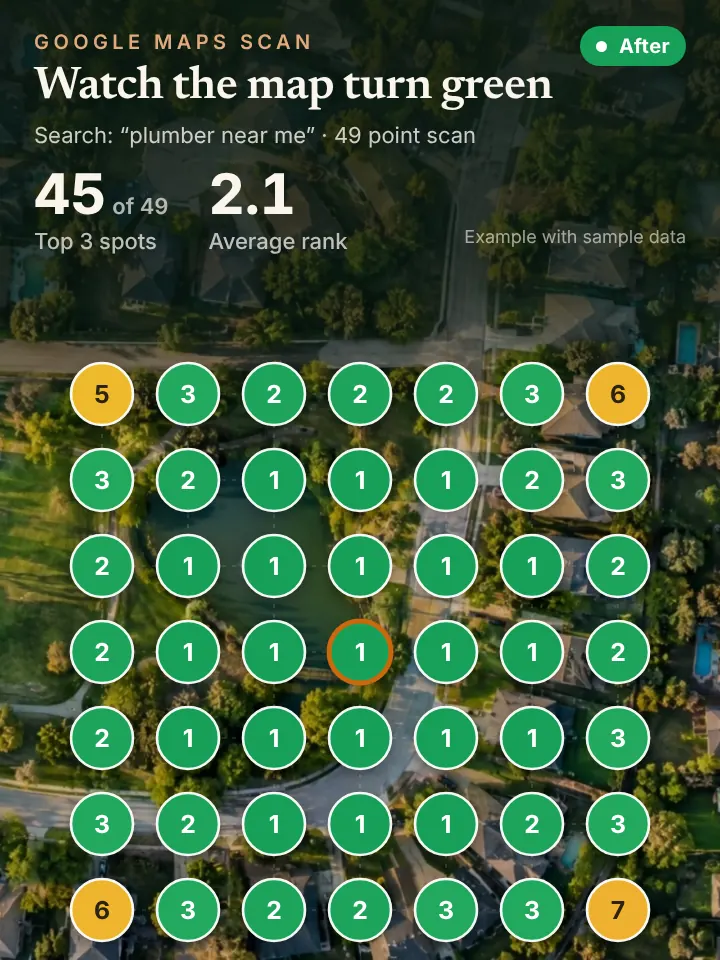
Once a month you get a report built around a 49 point grid scan from Local Falcon, showing your position across Chesapeake and nearby cities. It turns vague questions like how are we doing into a map you can read in a minute.
Keeping a Listing Current in Chesapeake
This part of Hampton Roads changes fast. Military households arrive and leave on orders, new subdivisions keep filling in around Grassfield and Hickory, and plenty of residents commute toward Norfolk, Portsmouth and Suffolk every day. A profile that reflects current services, hours and coverage meets those new customers where they are already looking.
The calendar gives you plenty to post about. Spring brings lawn and termite season, summer is all air conditioning and mosquitoes, and fall turns to storm prep before hurricane and nor'easter weather. Timely posts and fresh photos of local jobs show both Google and the customer that you are working in Chesapeake right now.
Holiday hours deserve special care. A listing showing open when you are closed around Thanksgiving or Christmas leads to angry calls and the occasional bad review, and it takes seconds to prevent.
How Profile Management Connects to Maps, AI and Calls
A well kept profile is the backbone of map ranking, and it is also one of the sources AI assistants draw from when someone asks who to call in Chesapeake. Keeping it accurate supports both at once.
More visibility brings more ringing phones. For owners who cannot step away from a job in South Norfolk, our AI receptionist picks up instantly, books the visit and passes urgent calls along to you.
Five Things to Check on Your Own Listing
Sign in to the account that owns your profile and confirm you can still reach it. Plenty of owners discover that a former employee or an old marketing vendor holds the only access, which is worth fixing before something goes wrong.
Check the hours, phone number and website link, then scan your services list for anything missing. Look at when your last photo and last post went up, and count how many recent reviews still lack a reply.
Finally, check the users section and remove anyone who no longer works with you. Keep at least two trusted owners on the account so you are never locked out.
Get Your AI Visibility Audit
Curious how your listing measures up before you hand anything off? Fill out the short form on peaklocalserviceleads.com/AIVisibilityAudit and we will send back the AI Visibility Audit, a no cost look at your profile, your grid results and what assistants say about you, explained in a quick video.
Our team sits in Lavon, Texas. Every profile we manage, in Chesapeake or anywhere else, is handled remotely, and nothing posts until you sign off on it.
Google Business Profile Management in Chesapeake: common questions
How do I access my Google Business Profile manager?
Sign in to the Google account that owns the listing and search for your business name on Google or open Google Maps. The management panel appears right on the results page. If it does not, that account may not have access, and you will need to request it from the current owner.
Does Google charge for a Business Profile?
No, Google does not charge to create or keep a Business Profile. What takes time is keeping it accurate and active, which is the part most busy owners hand off.
Who has access to my Google Business Profile?
Open the profile settings and look at the people and access section. It lists every owner and manager. Remove anyone who should not be there and make sure you remain a primary owner.
How do I get my business off Google Maps?
If you have closed, you can mark the business permanently closed or remove the listing from your account settings. If you have only moved or changed service areas, update the profile instead, since removing it throws away your reviews and history.
See where you stand on the map and in AI answers
We check how your business shows up across your service area on Google Maps and whether ChatGPT, Gemini and other assistants name you, then send you the findings with a short walkthrough video.
Request your AI Visibility Audit