Why Billings Businesses Need Google Business Profile Management
Google Business Profile management in Billings is the ongoing work of keeping your listing accurate, active and trusted, week after week. Plenty of contractors set up a profile years ago, added a logo and never touched it again, and Google notices when nothing changes.
A stale profile shows old hours, a short service list and reviews nobody answered. Meanwhile a homeowner on the South Side is comparing you with two other companies in the map results, and the one that looks alive usually gets the call.
What Done For You Profile Management Includes
We handle the routine so you do not have to remember it. That covers categories, services, your service area across Yellowstone County, a keyword rich description, real photos from your jobs and a weekly post about the work you are doing right now.
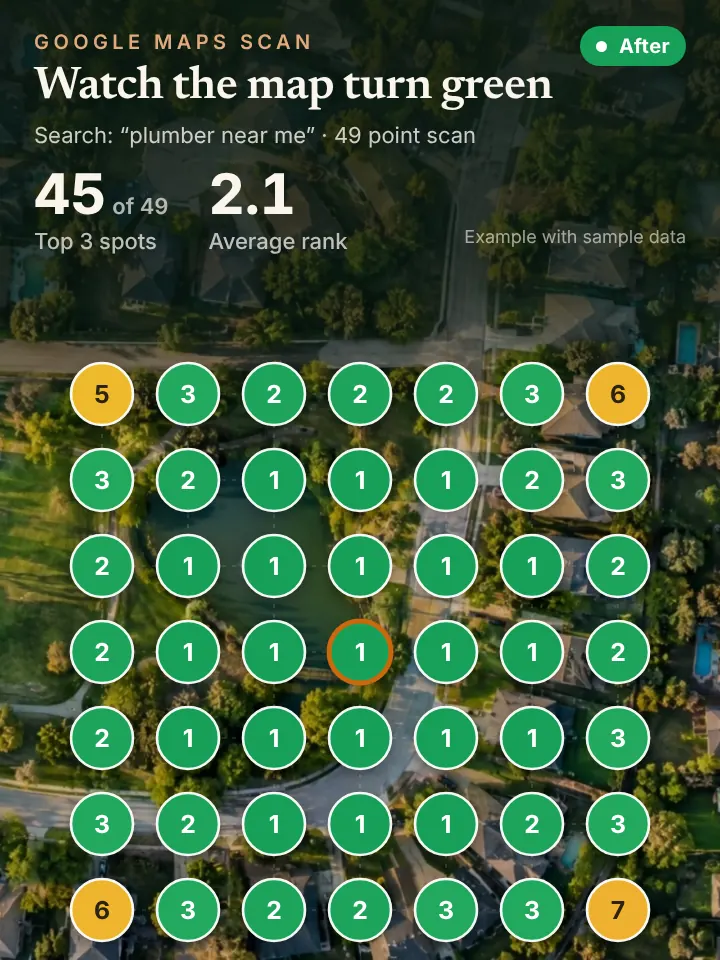
Reviews get attention too. We send review requests after completed jobs and draft a reply to every review, good or rough, for you to approve before it goes live. Each month you get a report built on a 49 point grid scan that shows how your ranking moved across town.
You never have to log in or learn the dashboard. Drafts come to you in a simple message, you approve or tweak them, and the work goes live. If you want to add a job photo from your phone, send it over and it becomes part of next week's post.
Keeping a Billings Profile Fresh Through the Seasons
Billings work follows the weather. After a summer hail storm, posts and photos about roof inspections, siding and gutter repair belong on the profile within days, not months. When the deep cold settles in, the focus shifts to furnace tuneups, frozen lines and emergency availability.
Hours change with the seasons as well, and holiday closures matter to people searching on a weekend. Keeping those details correct is a small thing that prevents wasted calls and frustrated customers.
Service area matters in a place this spread out. If you take jobs in Lockwood, Shepherd, Huntley, Worden or Park City, the profile should say so plainly, and your posts and photos should show work in those communities, not only downtown.
How a Managed Profile Feeds Maps, AI Answers and Calls
Your profile is the base for map pack ranking and one of the main sources AI assistants lean on when they recommend a local company. When the categories, services and reviews line up, both kinds of search have more to work with.
An active profile tends to bring more calls, so it helps to have every one answered. Some owners add an AI receptionist that picks up on the first ring and books the appointment while the crew is on a roof.
A Quick Profile Health Check for Billings Owners
Open your profile and look at the date of your last post and your last photo. If either is more than a month old, that is the first fix. Then scroll through your reviews and see how many are still waiting for a reply.
Next, compare your listed hours with your real hours, including winter and holiday changes. Check that every service you sell appears in the service list, and confirm the service area includes the towns around Billings where you actually drive.
Finally, search your company name and read the profile the way a stranger would. If the description still mentions a service you stopped offering or misses one you started last year, that is an easy fix that changes how customers see you.
Get a Clear Look at Your Billings Profile First
Before you hand anything off, request the AI Visibility Audit. This no cost review shows how your profile ranks across Billings, what AI assistants say about you, and what is missing, all explained in a short walkthrough video.
Visit https://peaklocalserviceleads.com/AIVisibilityAudit to request yours. Peak Local Service Leads works from Lavon, Texas and manages profiles for Montana owners remotely, with every reply and post sent to you for approval.
Google Business Profile Management in Billings: common questions
Where do I go to manage my Google Business Profile?
You manage it while signed in to the Google account that owns it, either by searching your business name on Google or through the Business Profile manager. If you want help, you can add a manager to the profile without giving away ownership.
Does Google charge to have a Business Profile?
Google does not charge to create or keep a Business Profile. The cost comes in the time it takes to keep it current, which is why many Billings owners hand the weekly work to someone else.
Do I need an LLC to have a Google Business Profile?
No. Google asks for a real business that serves customers, and sole proprietors qualify. What matters is that your name, phone number and service area are accurate and match your other listings.
How do I add someone as a manager on my profile?
In your profile settings there is an option for people and access, where you can invite a manager by email. The owner keeps control and can remove a manager at any time.
See where you stand on the map and in AI answers
We check how your business shows up across your service area on Google Maps and whether ChatGPT, Gemini and other assistants name you, then send you the findings with a short walkthrough video.
Request your AI Visibility Audit